ChatGPT-4: Exploring the New Beta Features and Their Benefits
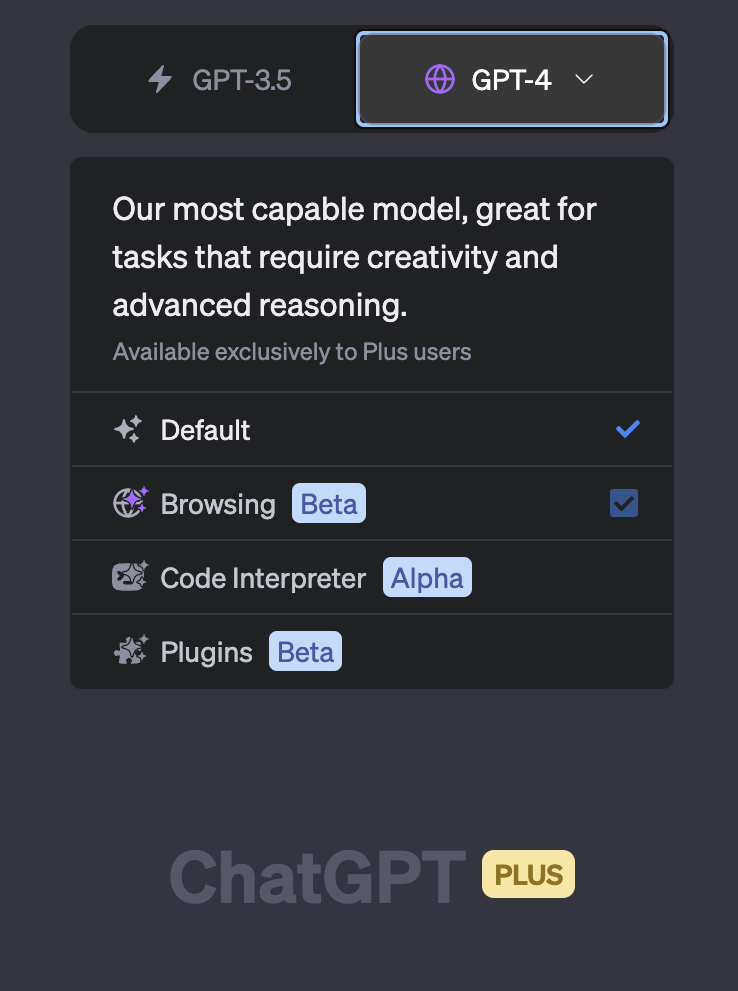
OpenAI has recently unveiled the new beta features of ChatGPT-4, a groundbreaking advancement in the world of artificial intelligence. This version introduces two major features: web browsing and the use of built-in plugins. These features not only enhance the capabilities of ChatGPT-4 but also redefine the way users interact with this AI model.
The New Beta Features: Web Browsing and Plugins
The first of the new beta features is web browsing. This feature allows ChatGPT-4 to access the internet, expanding its knowledge base beyond the training corpus to fresh information from present-day sources. This means that ChatGPT-4 can now provide users with the most up-to-date information, making it an even more valuable tool for research and learning.
The second feature is the introduction of built-in plugins. These plugins allow ChatGPT-4 to interact with more than 70 third-party services, including popular platforms like Instacart, Expedia, Klarna, and OpenTable. This means that users can now use ChatGPT-4 to perform a wide range of tasks, from booking flights to ordering groceries, all within the same interface.
The Benefits of the New Features
The introduction of web browsing and plugins brings a wealth of benefits to ChatGPT-4 users. For one, these features significantly expand the capabilities of ChatGPT-4, transforming it from a simple conversational AI into a powerful tool that can perform a wide range of tasks.
Furthermore, these features make ChatGPT-4 more convenient to use. With the ability to browse the web and use plugins, users no longer need to switch between different apps or platforms to perform different tasks. Instead, they can do everything they need within ChatGPT-4, saving time and effort.
How to Use the New Features
Using the new beta features of ChatGPT-4 is straightforward. To enable web browsing and plugins, follow these steps:
- Open ChatGPT-4 and go to your settings.
- Look for the "Beta Features" option.
- Toggle on "Web Browsing" and "Plugins".
Once these features are enabled, you can start using them right away. For example, you can ask ChatGPT-4 to search the web for information or use a specific plugin to perform a task. The AI will understand your request and use the appropriate feature to fulfill it.
In conclusion, the new beta features of ChatGPT-4 represent a significant leap forward in the capabilities of AI. With the ability to browse the web and use plugins, ChatGPT-4 is now more powerful and versatile than ever, offering users a wealth of benefits and making it an indispensable tool in the modern world.

Comments
Post a Comment